If you’ve been searching for how to get voice chat on Roblox, you’ve landed in exactly the right place. Roblox voice chat — often called VC by the community — lets eligible players speak to each other in real time using a microphone while inside supported experiences. It transforms gameplay from a silent text-scrolling session into something that actually feels alive.
But here’s the catch: voice chat in 2026 is not a simple toggle. Roblox rolled out a sweeping overhaul of its entire communication system starting in late 2025 and completing its global rollout in January 2026. The old method of phone verification no longer works. Age checks are now mandatory. And the feature is still gated behind verified eligibility, not just account age.
This guide covers everything — the new 2026 requirements, step-by-step setup instructions for PC, mobile, and console, troubleshooting, platform-specific quirks, safety rules, and the FAQ answers you actually need. No filler, no guesswork.
What Is Roblox Voice Chat and Why Did It Change in 2026?
Roblox Voice Chat is a proximity-based voice communication system built directly into the platform. When it’s active in a supported experience, players who are near each other in-game can hear each other speak through their microphones, just like spatial audio in real life. The closer your character is to another player, the louder their voice sounds. Move away, and the audio fades.
It’s a massive immersion upgrade for games like Roblox Arsenal, Brookhaven RP, Phantom Forces, Da Hood, and any roleplay or team-based experience that developers have chosen to enable voice for.
The 2026 Communication Overhaul Explained
In November 2025, Roblox announced it would become the first major online gaming platform in the world to require facial age checks for all communication features. The rollout began voluntarily in December 2025, became mandatory in select markets (Australia, New Zealand, Netherlands) shortly after, and expanded globally in January 2026.
The reason for the change is safety. Roblox has a massive player base that skews young, and the platform’s old system — where users simply entered a birthdate — had obvious limitations. The new system uses Facial Age Estimation (FAE) powered by biometric AI and optional government ID verification to actually confirm who you are before granting access to voice, text, and party chat.
This means:
- Phone number verification no longer unlocks voice chat. This is the single most common point of confusion in 2026. If you verified your phone and expected VC to appear, it won’t. That path is closed.
- All users must complete an age check — not just new accounts. Existing accounts that skipped verification are now locked out of chat features until they comply.
- Age groups now govern who can talk to whom, not just whether voice is available.
Who Can Get Voice Chat on Roblox in 2026?
Before you touch a single settings menu, understand the eligibility wall. Voice chat has hard requirements, and no workaround bypasses them without risking a permanent ban.
The Core Requirements
| Requirement | Details |
|---|---|
| Minimum Age | 13 years old (verified, not self-reported) |
| Age Check | Facial Age Estimation OR government ID verification |
| Supported Region | 70+ countries supported (see regional list below) |
| Supported Experience | Developer must have enabled voice in that specific game |
| Device Microphone | Operating system must allow microphone access for Roblox |
Who Cannot Get Voice Chat
- Any account verified as under 13 years old. No exceptions, no parental override.
- Accounts in unsupported regions that haven’t completed ID verification.
- Accounts that have only completed phone verification (no longer valid for VC).
- Accounts flagged for suspicious activity or policy violations.
If you are under 13, this guide cannot help you unlock voice chat — because it’s a hard platform restriction tied to child safety law, not a setting you can toggle.
The Two Ways to Complete Your Age Check
Your path to voice chat starts with the age check. Roblox offers two methods, and which one works for you depends on your region and preferences.
Method 1: Facial Age Estimation (FAE)
This is the faster option — no documents required. Roblox’s AI analyzes a brief video of your face using technology from its verification partner and estimates your age group. The video and images are deleted immediately after processing.
Pros: Takes under 60 seconds. No documents needed. Works on mobile directly.
Cons: The AI isn’t perfect. Users on the edge of age brackets (especially the 17–21 range) have reported being categorized into a lower age group than their actual age. Poor lighting or unusual camera angles can cause the system to fail. If you’re 17 or older and care about accessing the full range of features, Method 2 is more reliable.
How to complete Facial Age Estimation:
- Open Roblox on mobile, desktop app, or Roblox.com
- Go to Settings
- Tap or click Account Info
- Look for the age check prompt — it may appear automatically or under a “Verify My Age” button
- Follow the on-screen instructions for the facial scan
- Wait for confirmation (usually immediate, occasionally up to a few hours)
Method 2: Government ID Verification
This method uses a passport, driver’s license, or state/national ID. It’s more accurate and is the only reliable way to verify if you’re 17+ and want access to mature-rated content and unfiltered voice features.
How to complete ID Verification:
- Open Roblox and go to Settings → Account Info
- Select Continue with ID
- Scan the front and back of your government-issued ID
- Complete the Liveness Check — you’ll move your head in a circle to confirm you’re a real person, not a photo
- Roblox processes the verification, usually within minutes
Important: ID verification is processed by Roblox’s third-party partner. Roblox’s official policy states that biometric data is deleted after processing and not stored long-term.
Step-by-Step: How to Enable Voice Chat After Age Verification
Once your age check is complete and you’ve been assigned to the 13+ (or 18+) age group, enabling voice chat is straightforward.
On PC (Desktop App or Browser)
- Open Roblox and sign in to your account
- Click the gear icon in the top-right corner to open Settings
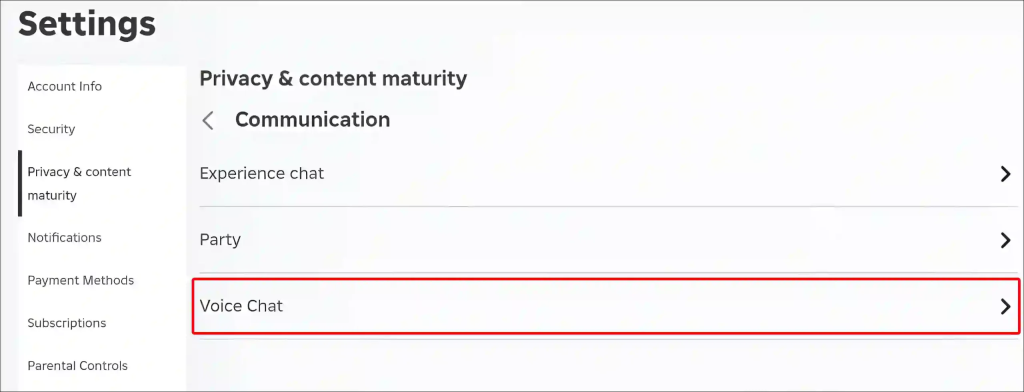
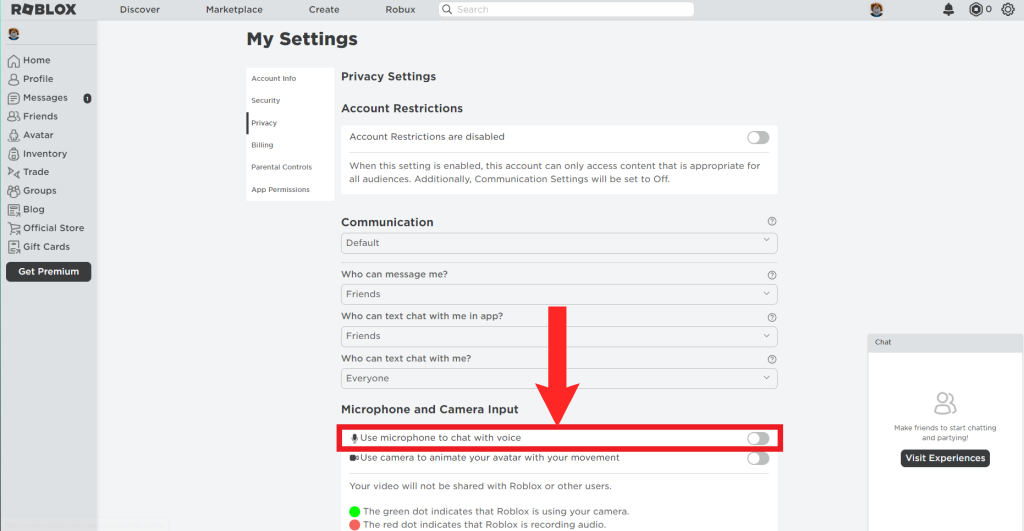
- Navigate to the Privacy tab
- Scroll down to the Voice Chat section
- Toggle Enable Voice Chat to ON
- Confirm any prompts that appear
If the toggle doesn’t appear, your age verification hasn’t completed yet, or your region doesn’t support voice without ID verification.
On Mobile (iOS and Android)
The mobile app and desktop app share the same settings structure after Roblox unified them in late 2025.
- Open the Roblox app
- Tap the three-dot menu or your profile icon
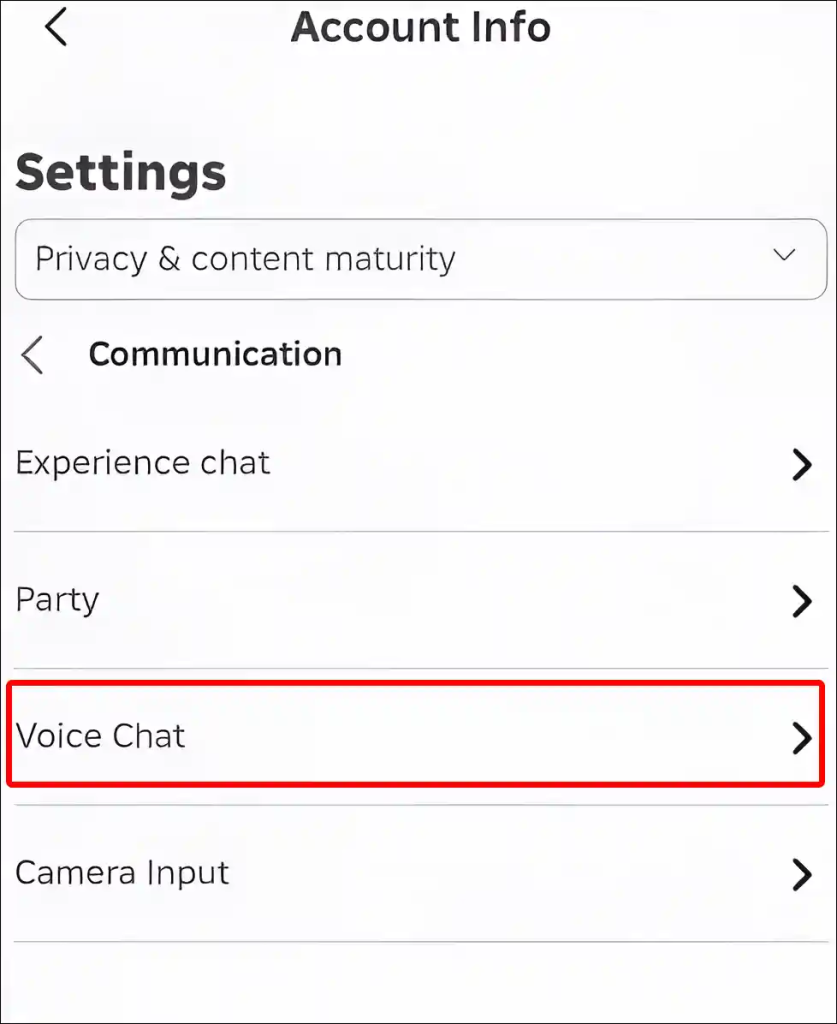
- Go to Settings → Privacy & Content Restrictions
- Select Communication → Voice Chat
- Toggle Enable Microphone to ON
- Grant microphone permission to the Roblox app if your phone prompts you
On PlayStation
Roblox supports voice chat on PlayStation, but the path to join voice is slightly different.
- Join a voice-supported experience
- Open the in-experience settings menu (usually accessible via the pause button)
- Look for the Join Voice option
- Select it to connect your microphone
Make sure your PlayStation account has microphone permissions enabled at the system level, not just within Roblox.
On Xbox
Voice chat on Xbox operates through the platform’s own party system. Roblox’s in-experience voice interacts with Xbox’s audio infrastructure. Ensure your Xbox account has communication permissions enabled for your profile before trying to activate voice in-game.
On VR
VR headsets with microphones are fully supported. Once voice is enabled in your account settings, it activates automatically in voice-supported experiences when you’re in VR mode.
How to Use Voice Chat In-Game
Turning voice chat on in settings is step one. Actually using it in an experience is step two — and they’re not the same thing.
Joining Voice in an Experience
When you enter a voice-supported experience with VC enabled:
- A headphone icon will appear in the upper-left of your screen
- Click or tap the icon to connect to voice
- Your microphone icon appears — when you speak, it animates in green
- A red dot on the microphone icon indicates Roblox is actively recording audio
Muting and Unmuting
- Tap the microphone icon to mute yourself. A red slash appears over the icon when muted.
- Tap again to unmute
- You can also mute individual players by clicking their microphone icon in the player list
Disconnecting from Voice
Go to in-experience settings and toggle Voice Chat from Connected to Disconnected. This disconnects your mic without disabling voice chat globally on your account.
Voice Chat Is Not in Every Game
This is a critical point that trips up a lot of players. Voice chat is developer-controlled. Roblox doesn’t force it into every experience. A developer has to intentionally integrate it using the Voice Chat API. Popular games like Brookhaven RP, Da Hood, Arsenal, and many roleplay and social experiences support it. Obby games, most tycoons, and older experiences often don’t. If you don’t see the headphone icon, the game simply doesn’t have voice enabled.
Party Voice: The Other Voice Chat Feature
Alongside proximity-based in-experience voice, Roblox introduced Party Voice — a separate system for communicating with your friends regardless of which game you’re in.
Party Voice is part of the Trusted Connections and Expressive Chat system launched in 2026. Here’s how it works:
- Ages 13–17 (both verified): Party Voice is available between Trusted Connections — people you’ve manually added from your real-life contacts or through QR code scanning
- Ages 18+ (both verified): Party Voice activates automatically in 1:1 conversations without needing Trusted Connection status
- Cross-age (18+ to 13–17): These connections can use Party Voice only if established through verified real-life methods (phone contacts, live QR scan)
Party Voice is not proximity-based. It works more like a persistent voice call that runs in the background while you and your party play different games together.
Supported Countries for Voice Chat (Without ID Verification)
Voice chat is available to all age-checked 13+ users in these countries without needing to provide a government ID:
Argentina, Australia, Austria, Azerbaijan, Belarus, Belgium, Bolivia, Brazil, Bulgaria, Canada, Chile, Colombia, Costa Rica, Croatia, Cyprus, Czech Republic, Denmark, Dominican Republic, Ecuador, El Salvador, Finland, France, Germany, Great Britain, Georgia, Greece, Guatemala, Honduras, Hong Kong, Hungary, Indonesia, Ireland, Italy, Japan, Kazakhstan, Kyrgyzstan, Malaysia, Mexico, Moldova, Netherlands, New Zealand, Nicaragua, Norway, Panama, Paraguay, Peru, Poland, Philippines, Portugal, Puerto Rico, Romania, Serbia, Singapore, Slovakia, South Korea, Spain, Sweden, Switzerland, Taiwan, Thailand, Ukraine, United States, Uruguay, Uzbekistan, and Venezuela.
If your country is not on this list, completing ID verification through a government document is your path to unlocking voice chat.
Roblox Voice Chat Age Groups and What They Mean
The 2026 update didn’t just gatekeep voice chat — it restructured the entire social experience into age tiers. Understanding these tiers tells you who can hear you and who you can hear.
The Age Bracket System
| Age Group | Voice Features Available |
|---|---|
| Under 13 | No voice chat, no direct messaging. Experience text chat only, with strict filtering. Ages 5–9 require parental consent even for experience chat. |
| 13–17 (Age-Checked) | In-experience voice chat in supported games. Party Voice with verified Trusted Connections only. Filtered text chat. |
| 18+ (Age-Checked) | Full in-experience voice chat. Party Voice with any verified 18+ connection automatically. Less filtered communication overall. |
Adults (18+) and minors (13–17) can only communicate through Trusted Connections established via real-life verification methods. This is a deliberate design choice to reduce unsolicited adult-to-minor contact.
Troubleshooting: Voice Chat Not Showing Up?
The most common complaint after the 2026 update is players completing age verification and then still not seeing the voice chat option. Here’s a systematic fix guide.
Fix 1: Age Verification Isn’t Actually Complete
Go back to Settings → Account Info and check your verification status. If it shows “Pending,” you need to wait. If it shows no verification at all, you need to start the process. A confirmation email is sent when verification succeeds.
Fix 2: Phone Verification Is Not Enough
If you only verified a phone number, voice chat will not appear. Phone verification no longer grants access to voice. You must complete Facial Age Estimation or ID verification specifically.
Fix 3: Microphone Permissions Are Blocked at the OS Level
On Windows: Go to Settings → Privacy & Security → Microphone and ensure Roblox has permission.
On Mac: Go to System Settings → Privacy & Security → Microphone and toggle Roblox on.
On iOS: Go to Settings → Roblox → Microphone and enable it.
On Android: Go to Settings → Apps → Roblox → Permissions → Microphone and allow it.
Fix 4: The Game Doesn’t Support Voice
Not every Roblox experience has voice chat. If you’re in a game and there’s no headphone icon, the developer hasn’t enabled it. Join a different experience known for supporting voice, like Brookhaven, Da Hood, or a social hangout game.
Fix 5: Regional Restriction
If you’re outside the supported country list and haven’t done ID verification, voice chat will remain locked. Submit government ID to bypass regional restrictions.
Fix 6: Account Flagged or Restricted
Accounts involved in policy violations may have communication features temporarily or permanently restricted. Contact Roblox support if you believe this is an error.
Voice Chat Safety: What Roblox Monitors and Why It Matters
Understanding the safety layer around Roblox voice chat helps you use it responsibly and avoid losing access.
All Voice Is Monitored
Roblox has been explicit: voice chat is not encrypted end-to-end. All audio is monitored using AI algorithms for violations of the Community Standards. This is a condition of using the feature. If you’re using third-party platforms or external Discord servers as your primary voice communication with Roblox friends, that exists outside Roblox’s monitoring — but also outside its moderation protections.
Report and Mute Tools
Inside any voice-supported experience, you can:
- Mute specific players without leaving voice entirely
- Report players for abusive voice behavior directly from the in-game player list
- Block players to prevent future contact
What Can Get Your Voice Chat Revoked
- Using slurs, hate speech, or targeted harassment on voice
- Attempting to share external links or personal information verbally
- Violating Community Standards in voice the same way you would in text
Roblox treats voice violations the same as text violations. The consequence can range from temporary communication bans to full account suspension.
Pro Tips for the Best Roblox Voice Chat Experience
Use a Decent Headset or Microphone
The built-in laptop microphone picks up keyboard clicks and background noise. Even a budget gaming headset significantly improves your experience and reduces noise for the players around you. Games like Phantom Forces and Arsenal where callouts matter benefit enormously from clear audio.
Keep Background Noise to a Minimum
Since Roblox’s voice monitoring is always active, noisy environments are a disadvantage both for gameplay communication and for avoiding false moderation flags.
Manage Who Can Hear You via Trusted Connections
If you want more control over who you’re communicating with beyond the proximity system, use the Trusted Connections feature with friends you actually know. This enables Party Voice, which is independent of whichever game you’re in.
Stay Muted When Not Actively Communicating
Proximity voice broadcasts to nearby players whether you intend it to or not. Develop the habit of staying muted in populated areas and unmuting deliberately for conversations. Most experienced players do this.
Check the Game’s Voice Policy Before Joining
High-quality roleplay experiences often have their own voice chat etiquette rules enforced by community moderators. Breaking in-game rules (like speaking out of character in an RP server) can get you kicked even if Roblox’s moderation hasn’t flagged you.
Common Mistakes to Avoid
Trying to use phone verification for voice chat. It won’t work. This was removed as a voice path entirely.
Verifying a child’s account using a parent’s face or ID. This places the account in an adult-level age bracket, exposing a minor to adult communication environments. It also violates Roblox’s Terms of Service.
Expecting voice chat to work in all games. Developer opt-in is required. No opt-in, no voice.
Ignoring microphone permissions on your device. Roblox can’t access your mic if your operating system blocks it, even if everything else is set up correctly.
Giving up after one failed Facial Age Estimation. If the FAE places you in the wrong age bracket due to lighting or camera quality, retry with better conditions or switch to ID verification.
The Future of Roblox Voice Chat: What’s Coming
Roblox’s developer forums and newsroom give a clear picture of where voice communication is heading on the platform in 2026 and beyond.
New API Tools for Developers
Following the January 2026 global age-check rollout, Roblox began shipping new API methods to help experience creators manage age-compatible player groupings. This means future games will have more sophisticated control over who can communicate with whom within specific experiences, not just at the platform level.
More Expressive Chat Features on the Roadmap
The Trusted Connections system is positioned as a framework for ongoing feature additions. Roblox has explicitly stated that new communication and expression tools will roll out to Trusted Connections first before any wider availability. Party Voice was one of the first. More are coming.
Team Create Voice for Creators
Voice communication is expanding into Roblox Studio via Team Create, allowing developers collaborating on experiences in real-time to speak to each other while building. This brings a professional collaboration layer to game creation.
Roblox as a Social Platform, Not Just a Game Platform
The entire arc of these communication changes points toward Roblox positioning itself more directly as a social metaverse — closer to Discord or Spatial than to a traditional gaming lobby. Voice chat is infrastructure for that shift. Expect the features around it (spatial audio improvements, voice-based moderation AI, cross-experience party systems) to expand significantly through 2026 and 2027.
FAQ: Roblox Voice Chat Answered
How do I get voice chat on Roblox?
Complete an age check (Facial Age Estimation or ID verification) to confirm you’re 13 or older, then go to Settings → Privacy and enable Voice Chat. You must be in a supported country and an experience that has voice enabled by its developer. Phone verification alone is not sufficient as of 2026.
Can you get voice chat on Roblox if you’re under 13?
No. Roblox’s policy is absolute on this. Accounts verified as under 13 cannot access voice chat under any circumstances, including parental consent. This is a global rule enforced by the platform’s safety system.
Why is there no voice chat option in my settings?
The most likely reason is that your age verification isn’t complete or was done via phone only. Go to Settings → Account Info and check your age verification status. If you only verified a phone number, you need to complete Facial Age Estimation or ID verification as an additional step.
Does Roblox voice chat work on mobile?
Yes. Roblox voice chat is available on iOS and Android through the Roblox mobile app. The settings path is Settings → Privacy & Content Restrictions → Communication → Voice Chat. Grant microphone permission to the app at the OS level if prompted.
What games on Roblox have voice chat?
Voice chat must be enabled by each experience’s developer. Popular games with voice support include Brookhaven RP, Da Hood, Arsenal, Phantom Forces, and many social hangout and roleplay experiences. If you don’t see the headphone icon in an experience, it doesn’t support voice.
Is Roblox voice chat safe for teens?
Roblox monitors all voice chat using AI for policy violations. The 2026 age bracket system limits who can communicate with whom — 13–17 year olds can only use Party Voice with verified Trusted Connections, reducing unsolicited adult contact. In-experience proximity voice in public lobbies carries the same social risks as any online voice chat. Using the mute and report tools is strongly recommended in unfamiliar servers.
Can I disable voice chat once it’s enabled?
Yes. Voice chat can be disabled at any time through the same Privacy settings used to enable it. Individual players can also be muted in-experience without disabling voice globally.
Why did my Facial Age Estimation put me in the wrong age group?
The AI can misread age in poor lighting, at unusual angles, or for users near the edges of age brackets. If you’re 17 or older and were placed in a younger group, switch to ID verification for accurate classification. ID verification overrides the FAE result.
Does voice chat work on Roblox Xbox?
Voice chat is available on Xbox, but it integrates with Xbox’s platform communication system. Ensure your Xbox profile has communication permissions enabled. The experience still needs to support voice, and your Roblox account must be age-verified.
How long does Roblox age verification take?
Facial Age Estimation is typically near-instant, though confirmation can occasionally take up to a few hours. ID verification processes within minutes in most cases. A confirmation email is sent when verification is approved. If you’ve waited more than 24 hours without confirmation, re-submit or contact Roblox support.
What is Party Voice on Roblox?
Party Voice is a persistent voice communication channel that works across different Roblox experiences with players in your Party. It’s separate from proximity-based in-experience voice. For ages 13–17, it’s available only with verified Trusted Connections. For users 18+, it activates automatically with other verified 18+ connections.
Can Roblox hear my voice chat?
Yes. Roblox explicitly states that voice chat is not end-to-end encrypted and is monitored by AI systems for violations of Community Standards. This is a condition of using the feature. Violations detected through voice monitoring are treated the same as text violations.
What happens if I violate Community Standards on voice chat?
Consequences range from temporary communication bans to full account suspension depending on the severity. Roblox’s AI and human moderation teams review flagged voice content. Repeat violations increase the severity of the response.
Is there voice chat in Roblox Studio?
Roblox is rolling out voice communication for Studio via Team Create, allowing developers building experiences collaboratively to speak with each other in real time. This feature is part of the broader 2026 communication expansion roadmap.
Why does Roblox require facial recognition for voice chat?
Roblox implemented Facial Age Estimation as an industry-first safety measure to reliably determine user age without relying on easily falsified self-reported birthdays. The goal is to limit communication between adults and minors. Images used in the process are deleted immediately after analysis and not stored by Roblox or its verification partner.
Conclusion
Getting voice chat on Roblox in 2026 requires a few deliberate steps — but once you’re set up, it genuinely transforms how you experience the platform. The shift to mandatory age verification is a significant one, and it has caused confusion for players who relied on phone verification or expected VC to just appear after signing up.
The core path is simple: complete your age check through Facial Age Estimation or government ID, ensure you’re 13 or older, enable voice in your Privacy settings, and then join an experience where developers have activated it. The headphone icon in the top left of your screen is your signal that voice is live.
The 2026 communication overhaul is bigger than just voice chat. Age groups, Trusted Connections, Party Voice, and new developer APIs are all part of Roblox’s push to build a safer and more socially layered platform. Understanding the system — rather than fighting it — puts you in a position to get the most out of it.
Whether you’re coordinating a raid in Phantom Forces, running a RP server in Brookhaven, or just hanging out with friends across different games via Party Voice, Roblox’s voice infrastructure is now robust enough to actually compete with external tools. Use it well.